
How to Calculate Work Hours for Payroll: Breaks, Decimals and Overnight Shifts
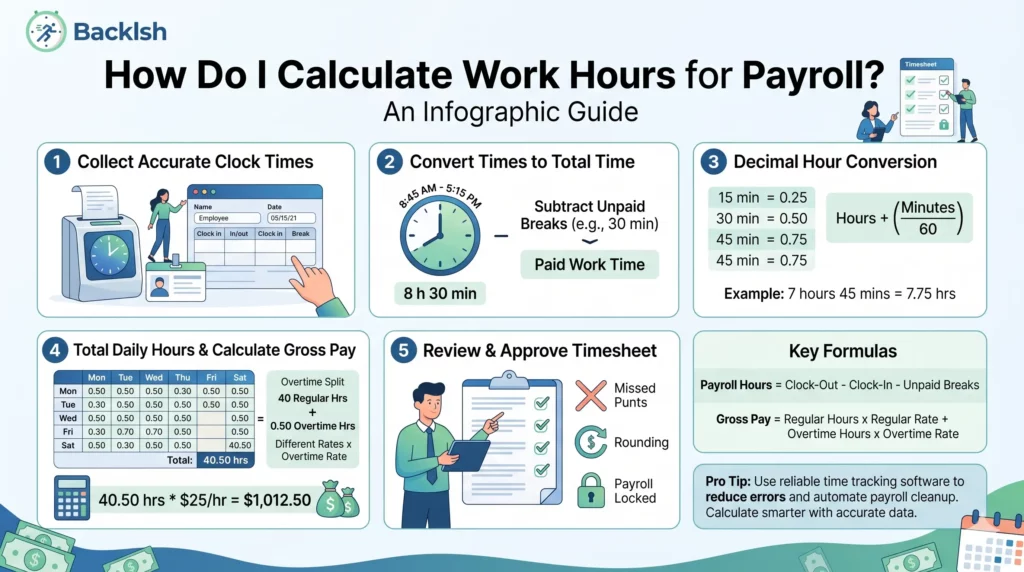
Calculate work hours for payroll by finding the elapsed time between clock-in and clock-out, deducting eligible unpaid breaks, and adding the remaining time across the workweek. Convert minutes to decimal hours before entering totals into a payroll system.
Work hours = elapsed shift time − unpaid break time.
Decimal hours = whole hours + (remaining minutes ÷ 60).
Check your shift now: Use the free Backlsh work-hours calculator with breaks and overtime thresholds. Choose Daily to check a shift or Weekly to add paid daily hours. The tool checks time arithmetic; it does not determine overtime eligibility or calculate wages.
This guide explains the arithmetic with illustrative examples. Break entitlement, overtime, rounding and recordkeeping depend on the employee’s location and employment arrangement. The US federal example below applies only to covered, non-exempt employees; it is not a worldwide payroll rule.
1. How do you calculate hours from clock-in and clock-out times?
Record the start and finish date and time for every work interval. For a same-day shift, subtract the start time from the finish time. Using 24-hour time can make afternoon calculations easier.
| Clock-in | Clock-out | Elapsed time |
|---|---|---|
| 08:35 (8:35 AM) | 17:20 (5:20 PM) | 8 hours 45 minutes |
You can check this in minutes: 17:20 is 1,040 minutes after midnight, and 08:35 is 515 minutes. Subtracting gives 525 minutes, or 8 hours 45 minutes. This is elapsed time before unpaid breaks.
For a split shift, calculate each interval and add them. Working 08:00–12:00 and 14:00–18:15 gives 4 hours + 4 hours 15 minutes = 8 hours 15 minutes. The two-hour gap is already excluded; do not subtract it again.
2. How do you subtract unpaid breaks?
Deduct only breaks that actually occurred and qualify as unpaid under applicable rules. Leave paid breaks in the total. A scheduled lunch is not proof that the employee took it.
| Calculation | Time |
|---|---|
| Elapsed shift: 08:35–17:20 | 8 hours 45 minutes |
| Actual unpaid lunch | 45 minutes |
| Time remaining for payroll review | 8 hours (8.00 decimal hours) |
If that shift also includes a paid 15-minute rest break, the result stays at 8.00 hours. Deducting it would incorrectly reduce the total to 7.75 hours.
If an employee worked through lunch, took a shorter break, or was interrupted by duties, confirm the facts before making a deduction. Under US federal FLSA guidance, short rest breaks generally count as work time, while a bona fide unpaid meal period requires relief from duties. Local rules can provide additional protections. See the US Department of Labor’s hours-worked guidance.
3. How do you convert hours and minutes into decimal hours?
Divide the remaining minutes by 60 and add the whole hours. For example, 7 hours 35 minutes = 7 + 35 ÷ 60 = 7.583333… hours, displayed as 7.58 when rounded to two decimal places.
7 hours 30 minutes is 7.50 hours, not 7.30. A decimal entry of 7.30 represents 7 hours 18 minutes.
Minutes-to-decimal conversion table
| Minutes | Decimal hours (2 places) |
|---|---|
| 5 | 0.08 |
| 10 | 0.17 |
| 15 | 0.25 |
| 20 | 0.33 |
| 25 | 0.42 |
| 30 | 0.50 |
| 35 | 0.58 |
| 40 | 0.67 |
| 45 | 0.75 |
| 50 | 0.83 |
| 55 | 0.92 |
| 60 | 1.00 |
These are display conversions, not permission to round clock punches. Keep the original minutes or full precision when adding time, then apply the payroll system’s required precision at the appropriate stage. For example, three 20-minute intervals total exactly 1 hour; adding three displayed values of 0.33 would produce only 0.99.
4. How do you calculate a shift that crosses midnight?
Use the actual start and finish dates. For an ordinary overnight shift, split the interval at midnight, add both parts, and then deduct unpaid breaks.
| Overnight example | Duration |
|---|---|
| Monday 22:15 to Tuesday 00:00 | 1 hour 45 minutes |
| Tuesday 00:00 to 06:45 | 6 hours 45 minutes |
| Total elapsed time | 8 hours 30 minutes |
| Less actual unpaid break | 30 minutes |
| Time remaining | 8 hours (8.00 decimal hours) |
Retain the dates so a finish time earlier than the start time is not mistaken for an error. If a shift crosses the employer’s workweek boundary, allocate the hours to the correct workweek before evaluating overtime. For daylight-saving changes or travel across time zones, calculate actual elapsed time using timestamps with the correct time-zone offsets.
5. How do you check a weekly timesheet before sending it to payroll?
Calculate each day after eligible unpaid breaks, then add the exact durations. The following example assumes all recorded breaks qualify as unpaid and no time-zone changes occur.
| Day | Clock-in | Clock-out | Unpaid break | Hours:minutes | Decimal hours |
|---|---|---|---|---|---|
| Monday | 08:30 | 17:00 | 30 min | 8:00 | 8.00 |
| Tuesday | 08:45 | 17:00 | 30 min | 7:45 | 7.75 |
| Wednesday | 08:30 | 17:15 | 30 min | 8:15 | 8.25 |
| Thursday | 09:00 | 17:30 | 30 min | 8:00 | 8.00 |
| Friday | 08:30 | 17:30 | 30 min | 8:30 | 8.50 |
| Total | — | — | 150 min | 40:30 | 40.50 |
The five shifts contain 43 elapsed hours. Subtracting 2 hours 30 minutes of unpaid breaks leaves 40 hours 30 minutes, or 40.50 hours.
Before-payroll review checklist
- Verify the employee and dates. Use the correct pay period and workweek boundaries.
- Resolve missing punches. Confirm corrections with the employee rather than substituting scheduled hours automatically.
- Find duplicate or overlapping entries. Check split shifts, overnight work and unusually long intervals.
- Confirm breaks. Check actual durations, interruptions and automatic deductions. Do not deduct paid breaks.
- Include all compensable work. Review work outside scheduled hours and time missing from the tracking record.
- Reconcile totals. Check daily sums, decimal conversions and the weekly total. Keep paid leave separate from hours worked for rule-specific calculations.
- Check rates and overtime. Review worker eligibility, applicable thresholds, multiple pay rates and any required premiums.
- Keep billing separate. Client-billable time is not necessarily the employee’s complete payable time.
- Document approval and export. Record corrections and reviewer approval, then compare the payroll import with the approved total. Retain the original record and an adjustment trail.
A schedule, an activity score or an unapproved timesheet is not, by itself, a complete determination of compensable time. Investigate exceptions before closing payroll; an approval workflow should not erase time that must be paid.
Separate hours from overtime and wage calculations
US federal example only: Covered, non-exempt employees generally qualify for at least 1.5 times their regular rate for hours worked beyond 40 in a workweek. Do not average two workweeks to avoid overtime. State or local requirements may be more protective. See Department of Labor Fact Sheet #23.
For the 40.50-hour example, assume a single $24 hourly rate, no other compensation affecting the regular rate, and only the stated weekly overtime rule:
| Pay component | Calculation | Amount |
|---|---|---|
| Regular pay | 40 × $24 | $960.00 |
| Overtime pay | 0.50 × $36 | $18.00 |
| Gross pay before deductions | $960 + $18 | $978.00 |
That threshold is an example, not a default for India, South Africa, the UAE or other jurisdictions. Confirm the rules for the employee’s actual work location and classification. Multiple rates, bonuses, daily overtime or other premiums need a separate review.
Check the math with the free work-hours calculator
Open the free Backlsh work-hours calculator and choose:
- Daily: Enter a shift’s start, finish and total unpaid break minutes.
- Weekly: Enter the daily paid hours after breaks; do not deduct the same breaks twice.
Set any overtime threshold deliberately. A calculator’s threshold models a calculation; it does not establish a legal entitlement. Compare the result with your approved time records before payroll.
For an ongoing team process, read about automatic project time tracking. For client work, see timesheets for consultants. Use recorded activity to support review while accounting for meetings, offline work and other compensable time.
Frequently asked questions
Quick answers to common questions.